
Two-week meal rotation: an all-season example plan
This is a two-week meal plan you can use as it is, or as a baseline for your own. It’s built from everyday meals, works most of the year, and follows a few simple rules:
- Mostly quick and medium meals. Weeknights are 20 to 45 minutes. The longer cooking happens on Sundays.
- Cook once, eat twice. Each week has batch meals that feed a later dinner or tomorrow’s lunch.
- Shared ingredients. Each week reuses the same vegetables and staples, so less ends up in the bin and you can buy more in larger batches.
- One open slot per week for eating out, takeaway or a fridge clear-out.
- Sunday cooks for Monday. Sunday’s dinner makes extra for Monday, the busiest evening for most people, even when Monday is in the other week.
The dish names link to well-rated recipes on RecipeTin Eats, BBC Good Food, Jamie Oliver and a few other popular sites. They’re suggestions: your own version of a dish works just as well. Using MealTwine? Download the plan as templates and import it in a minute.
How to read the plan
Every dinner is written for 4 portions, a normal recipe size. The label after each dinner tells you what kind of evening it is:
- (quick): 20 minutes or less.
- (medium): 30 to 45 minutes, often mostly hands-off.
- (batch): cook a double amount, about 8 portions. The extra goes into a later meal, and any rest into the freezer.
- (leftovers): uses something you cooked earlier. Mostly quick.
The lunch column is optional. It only lists leftovers, so it adds nothing to the shopping list. Skip it if you eat lunch at work, school or the canteen. For two people, the extra portions easily cover these lunches. For four, a batch covers the second dinner, so cook a little more if you also want lunch boxes.
Week A
| Breakfast | Dinner | Lunch (optional) | |
|---|---|---|---|
| Mon | Overnight oats with berries | Spaghetti with Sunday’s ragù (leftovers) | Sandwich and fruit |
| Tue | Yoghurt, granola and fruit | Tofu and vegetable stir-fry with rice (medium) | Spaghetti from Monday |
| Wed | Overnight oats with berries | Egg fried rice with peas and carrots (quick) | Stir-fry from Tuesday |
| Thu | Yoghurt, granola and fruit | Vegetarian bean chilli with bread (batch) | Fried rice from Wednesday |
| Fri | Overnight oats with berries | Open slot | Chilli from Thursday |
| Sat | Banana oat pancakes (freeze the extra) | Chilli quesadillas and salad (leftovers) | Bread, cheese, fruit |
| Sun | Boiled eggs, bread and jam | Lemon chicken traybake with potatoes and carrots (medium) | Brunch |
How it links up:
- Tuesday: cook double the rice. Half goes into Wednesday’s fried rice, which works best with cold, day-old rice.
- Thursday: cook 8 portions of chilli. Half is dinner, the rest is Friday’s lunch and Saturday’s quesadillas.
- Saturday: fill the quesadillas with the leftover chilli and cheese instead of making the recipe’s own filling.
- Sunday: roast 2 extra chicken thighs and an extra tray of vegetables for Monday’s wraps in week B.
- Saturday breakfast: freeze the leftover pancakes. Toasted, they’re a weekday breakfast in week B.
What week A shares: chicken thighs, tofu, rice, peppers, onions, carrots, frozen peas, eggs, tinned tomatoes, kidney and black beans, tortillas, cheese, lemon, oats, bananas, yoghurt.
Week B
| Breakfast | Dinner | Lunch (optional) | |
|---|---|---|---|
| Mon | Bircher muesli with apple | Chicken and roast vegetable wraps (leftovers) | Sandwich and fruit |
| Tue | Pancakes from the freezer | Red lentil dal with spinach and rice (batch) | Wrap from Monday |
| Wed | Bircher muesli with apple | Spinach, potato and feta frittata, salad (quick) | Dal from Tuesday |
| Thu | Toast with peanut butter and banana | Dal with flatbread and yoghurt (leftovers) | Frittata from Wednesday |
| Fri | Bircher muesli with apple | Pizza night with homemade dough (medium) | Dal from Tuesday |
| Sat | French toast with the end of the bread | Open slot | Pizza from Friday |
| Sun | Shakshuka with bread | Ragù with creamy polenta or mash (batch) | Brunch |
How it links up:
- Monday: Sunday’s chicken and vegetables go into wraps with yoghurt, lemon and whatever salad is there.
- Tuesday: cook 8 portions of dal, and stir in a few handfuls of spinach at the end. It’s Wednesday’s lunch, Thursday’s dinner and Friday’s lunch. Dal also freezes well.
- Wednesday: use any roast potatoes left from Sunday, or boil a few while the oven heats.
- Friday: the dough can be made up to a few days ahead and kept in the fridge.
- Sunday: cook 8 portions of ragù (beef, or lentils for a vegetarian version). Half is Sunday dinner, the rest is Monday’s spaghetti in week A. Freeze anything left.
- Bircher muesli: mix it in the evening, or make three portions on Sunday and Wednesday evening. It keeps two to three days in the fridge.
What week B shares: chicken (from Sunday), red lentils, coconut milk, spinach, eggs, feta, potatoes, yoghurt, flatbread or naan, pizza dough, mozzarella, tinned tomatoes, minced beef or lentils, oats, apples.
Make it fit your household
No sample plan fits everyone. Here’s how to adjust this one:
- Cooking for one or two. Keep the recipe sizes. The extra portions become your lunch boxes, and the batch meals fill the freezer for a later week. Buy the smallest packs, and freeze half the bread and tortillas.
- Family with young kids. Serve the parts separately: plain rice, sauce on the side, vegetables they can pick. Kids can help with the pizzas and the quesadillas. Make the chilli and dal mild and add the heat at the table.
- Teenagers or big appetites. Add a side (bread, rice, a second vegetable) instead of cooking a whole extra meal, or cook every dinner at 6 portions.
- Busy or changing work schedule. The label matters more than the day. Put the batch meals on whichever evening is free, and keep the leftover meal one or two days after it. If you work evenings, cook the batch meal at lunchtime.
- Vegetarian. The stir-fry, chilli, dal, frittata, fried rice and pizza already are. Swap the traybake chicken for halloumi or chickpeas, and the ragù for a lentil ragù.
- Different shopping day. Start week A on the day after you shop, so the fresh vegetables come first.
Keep leftovers in the fridge for no more than two or three days, or freeze them on the day you cook.
Summer swaps
The plan works all year, but in summer the oven and the heavy dishes lose their appeal. Keep the frame and swap these:
| Instead of | In summer |
|---|---|
| Bean chilli | Grilled halloumi or chicken with a big bean salad |
| Lemon chicken traybake | Barbecue or grilled chicken with potato salad |
| Ragù with polenta | Pasta with fresh tomatoes, basil and mozzarella |
| Shakshuka | Bread, eggs and a tomato salad |
For the colder months, there’s a winter rotation with a Christmas block.
Use it in MealTwine
In MealTwine, the two weeks become two templates, week A and week B. The quickest start is to import them ready-made:
Get this plan straight into MealTwine
Instead of typing it all in, download the file and import it. You get all the meals with their ingredients, steps and recipe links, plus week A and week B as templates. Your own meals and plan stay as they are.
- Download the file on your phone. On a computer, send it to your phone first, for example by email.
- In MealTwine, open the menu and tap Data management.
- Under Export & import, tap Import, keep Templates ticked and tap Import again.
- Pick the file you downloaded, usually in Downloads (Android) or the Files app (iPhone). The templates then show up in the Templates tab.
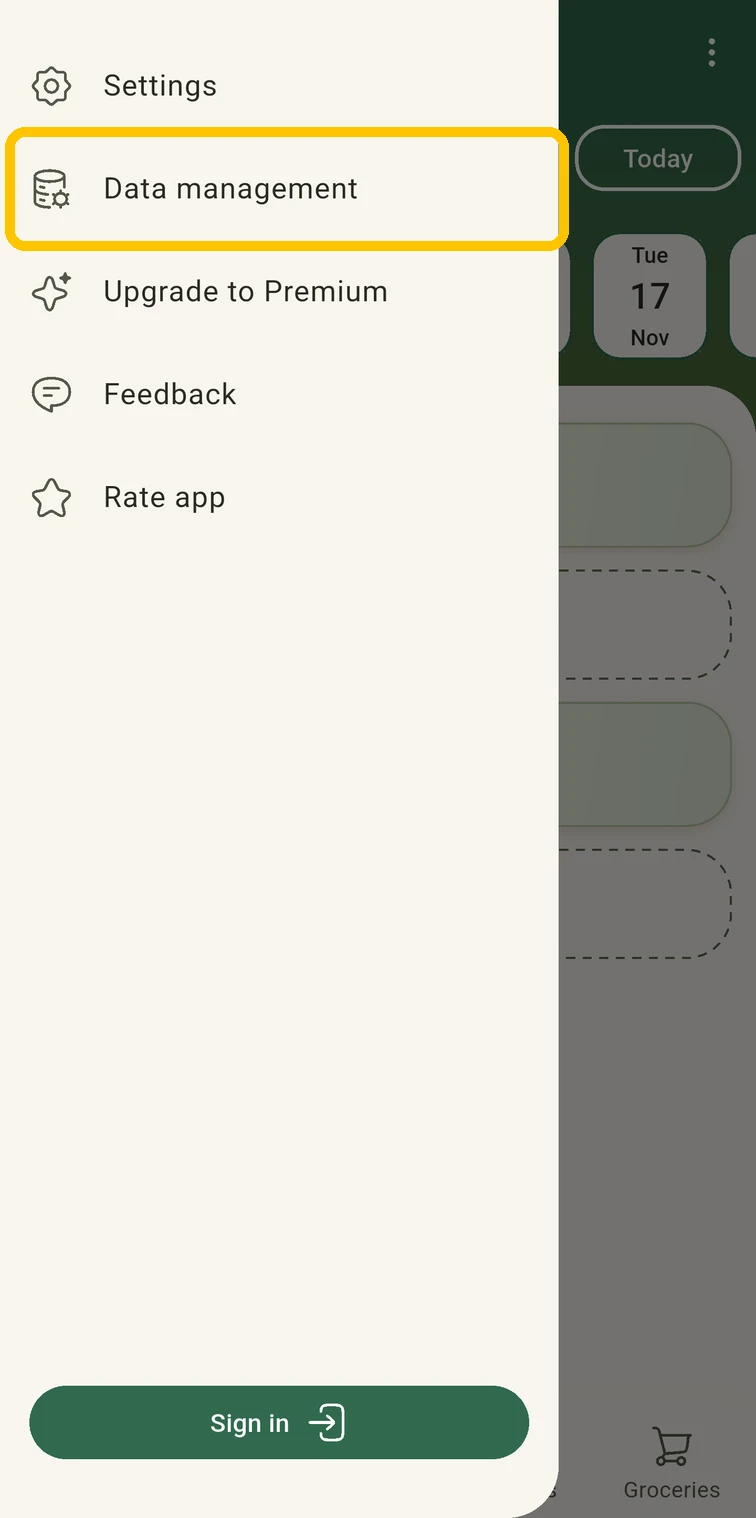 Open the menu, tap Data management
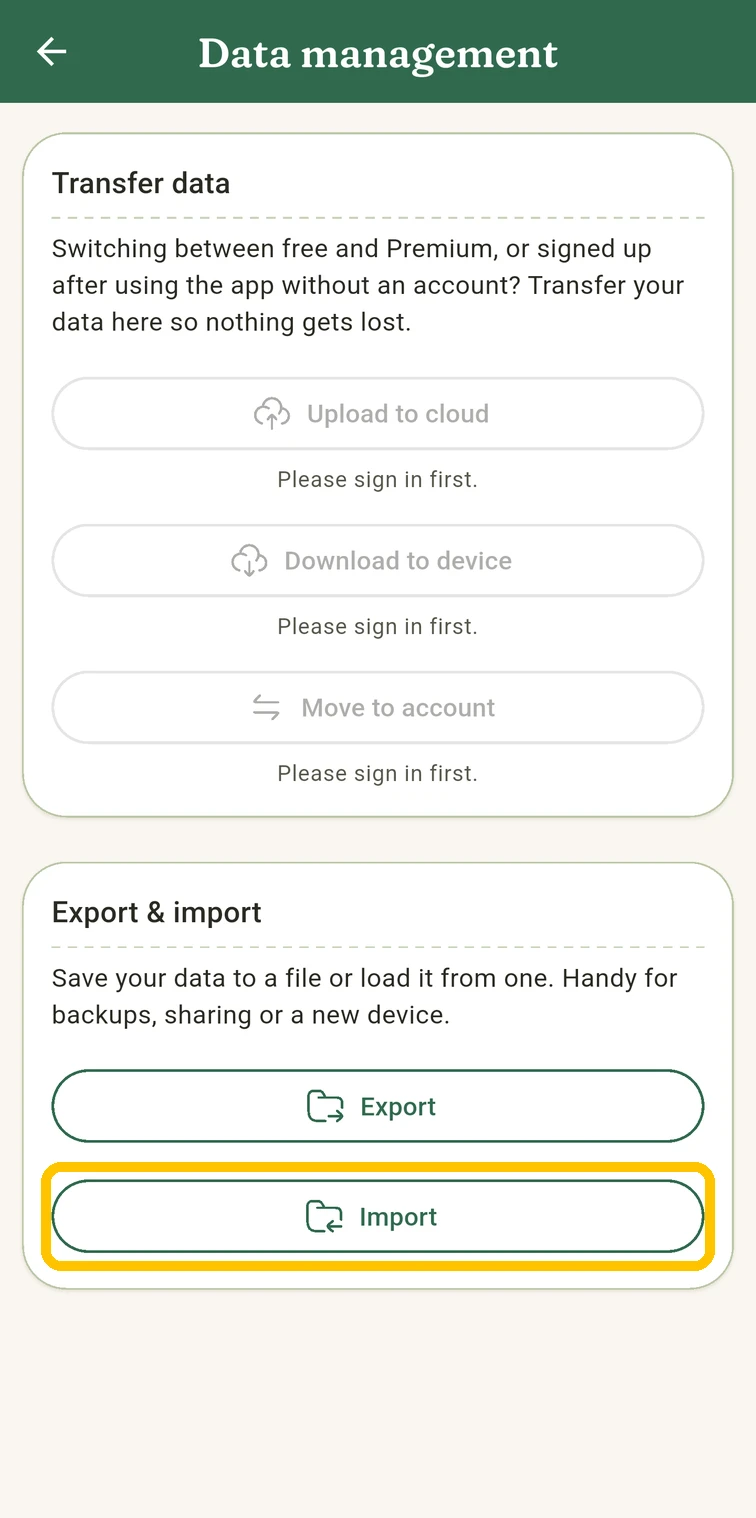 Under Export & import, tap Import
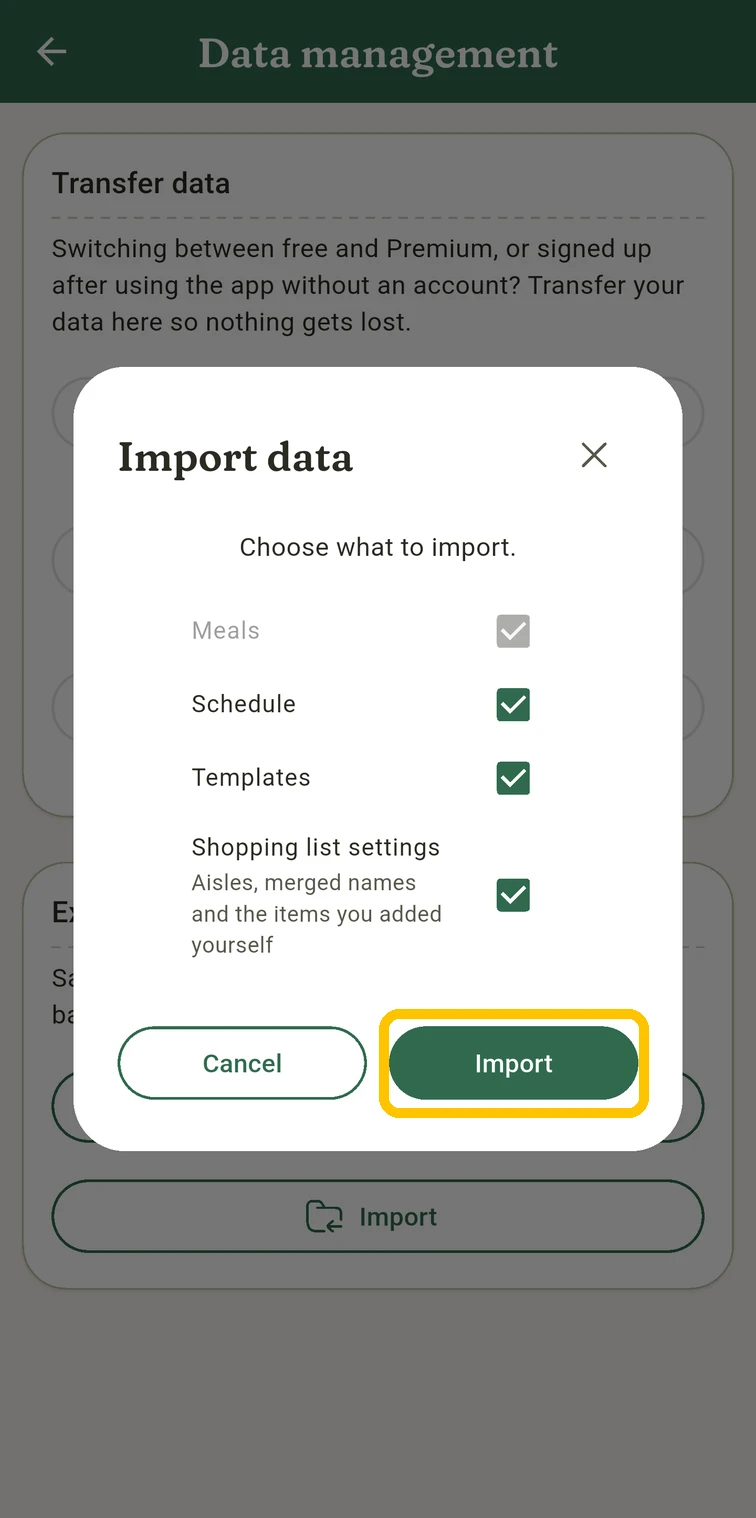 Keep Templates ticked, tap Import
With the ingredients already in, a whole week's shopping list is a few taps away. Only a few simple meals, like toast or leftovers, come without ingredients. Add some if you want them on the list too.
Each week, put the next template on your schedule: tap the calendar icon on its card, pick the start day and confirm. Swap what doesn’t fit, and make the shopping list in one go. The template walkthrough shows every screen.
You don’t have to import or type the plan in first. Plan the two weeks as normal days in your schedule, and once they’ve worked, keep each week as a template: New template in the Templates tab, then Last week. After a few rounds, replace the meals that nobody looked forward to with your own regulars. That’s when it becomes your rotation.
Built a rotation you love? Send it to us at info.mealtwine@gmail.com, even as a simple list of dishes. We’d love to cook it ourselves, and with your permission we’ll add it to these guides.